
This article explains how to wire and configure the analog mA outputs on a Krypton® Multi. Up to five outputs (mA1–mA5) are available when the mA output add-on is activated. Typical uses include PLCs, SCADA systems, data loggers, and dosage pumps.
Before you begin
- Confirm the mA output add-on is licensed and activated. After activation, mA OUT appears under Main menu > In/Out.
- Disconnect power before connecting or re-terminating mA wiring unless you are following your site’s live-work procedure.
- Use a shielded cable suitable for 0–20 mA or 4–20 mA loops and observe the load requirements of the receiving device.
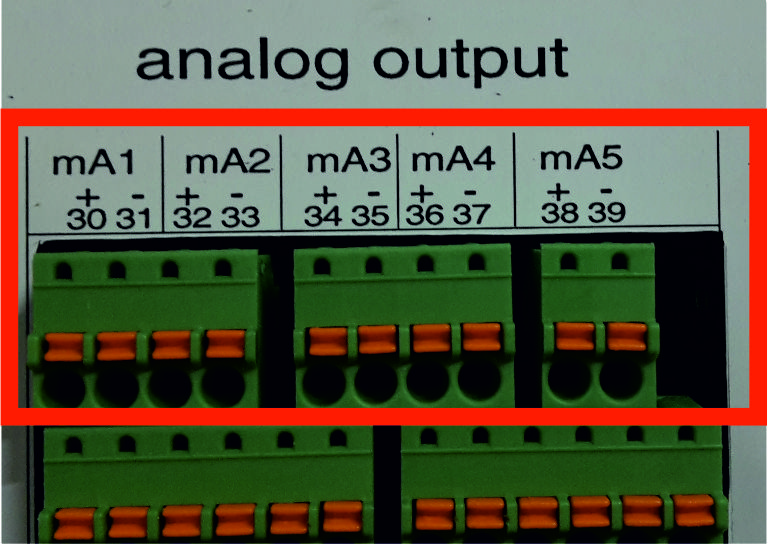
mA output terminals (30–39)
The analog output block is labeled mA1 through mA5 on the terminal strip. Each channel uses a + and − terminal. Connect the loop return of your external device to the matching pair.
| Output | Polarity | Terminal |
|---|---|---|
| mA1 | + | 30 |
| mA1 | − | 31 |
| mA2 | + | 32 |
| mA2 | − | 33 |
| mA3 | + | 34 |
| mA3 | − | 35 |
| mA4 | + | 36 |
| mA4 | − | 37 |
| mA5 | + | 38 |
| mA5 | − | 39 |
Configure outputs in the main menu
After the field wiring is complete, configure each mA channel in the instrument:
- Go to Main menu > In/Out > mA outputs > mA1 (repeat for mA2–mA5 as needed).
- If the channel shows not in use, open the drop-down and select the parameter to transmit (for example DIS, pH, temperature, or a control variable).
- Choose 0–20 mA or 4–20 mA and set alarm and range/scaling values in the menu that appears.
- Save the settings and verify the output at the connected device or with a loop meter.
For detailed parameter options after add-on activation, see mA Output Add-On - Krypton® Multi (assignment, scaling, and test).
Important notes
- Measuring range: The scaled mA range must match the receiving hardware (PLC span, pump input, and so on). A mismatch can cause “mA out of range” events or incorrect readings.
- Control outputs: If the mA output is used for control (dosing), assign the mA output to S1 or S2 as required by your application.
- HOLD mode: When the controller is in HOLD, all outputs including mA are inactive.
- Load impedance: An activated mA output with no load or a broken wire can trigger a load impedance error—check wiring and assignment under Main menu > In/Out > mA OUTPUT.
Comments
0 comments
Please sign in to leave a comment.