
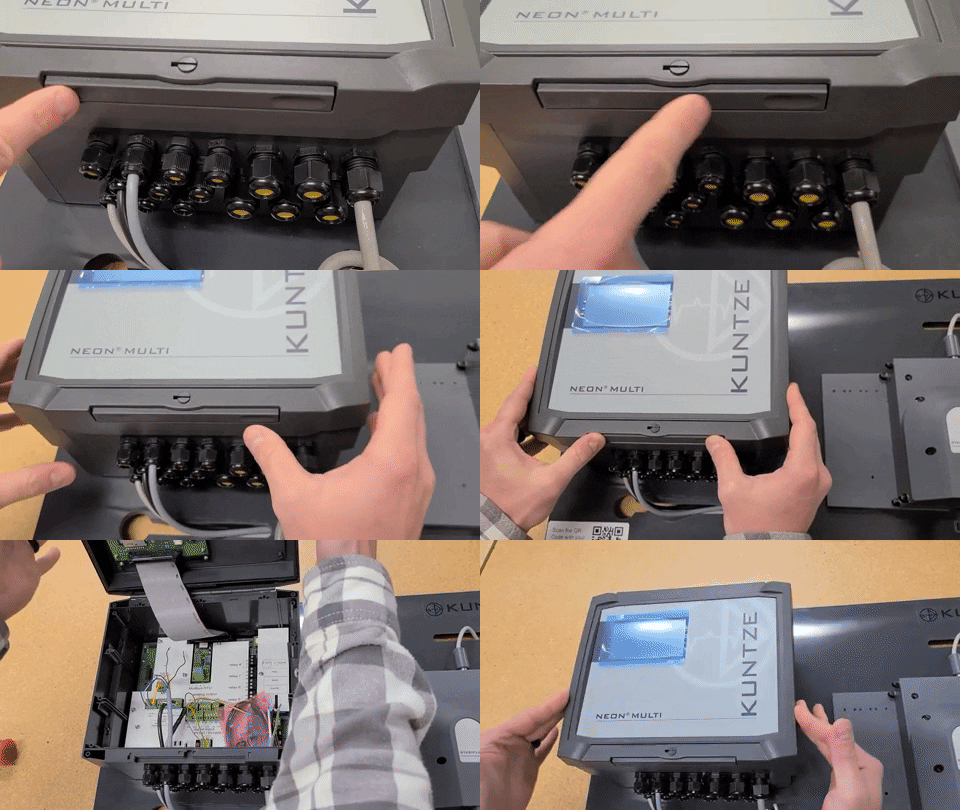
The Krypton® Multi enclosure lid uses a snap-on mechanism. Follow the steps below to open and close it without damaging the seal or latches.
Safety
- Before opening the enclosure for wiring or service, disconnect power unless your procedure explicitly requires otherwise.
- Do not force the lid; if it does not release, recheck that you are pressing the correct area (see diagram).
Opening the lid
- Push in on the area outlined in red on the lid (release point for the snap mechanism).
- Lift or swing the lid open as the catches release.
Closing the lid
- Align the lid with the enclosure.
- Push firmly on the areas outlined in green until you feel a click at each latch.
- The lock pin sits between the two green-marked zones. Use it to secure the lid in the locked position after closing.
Important: Make sure the lock pin is correctly engaged after closing; poor engagement can allow water ingress into the electronics.
Related Articles
- Krypton® Multi Terminal Connection Wiring Guide
- Insert RS485 Modbus card — Krypton® Multi
- Krypton® Multi Installation and Setup (Europe)
- Where is the SD card? (Krypton® Multi)
Comments
0 comments
Please sign in to leave a comment.