
Understand the different modes of operation and how to select the mode that fits your installation. This article applies to legacy Krypton® Multi, Krypton® DIS, and Krypton® DIS (Total) where the same MODE logic is used (exact icons depend on firmware).
Changing the mode
There are three modes of operation. To change mode, select the MODE symbol in the main menu. The icon updates to reflect MAN, HOLD, or AUTO.
MODE indicator on the display
Your housing and firmware may match either screenshot below; behavior of the three modes is the same.
Krypton® Multi and Krypton® DIS / DIS (Total) (typical MODE screen)
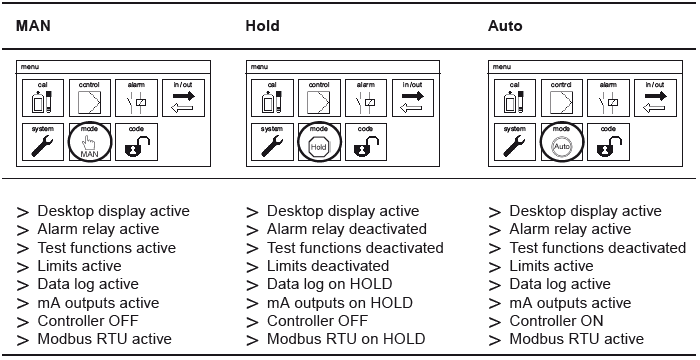
Mode definitions
- MAN
All outputs are active, but not driven by the instrument’s internal controller logic (PID). Use when dosing is handled externally or you only need raw outputs.
- HOLD
All outputs are deactivated. Use during maintenance, service, or when the process must not receive controller commands.
- AUTO
Outputs are active and linked to controller settings (limits, dosing, relays, mA where configured).
Note: If you are not dosing chemicals directly from the Kuntze analyzer, MAN is usually the appropriate choice.
Licensed features
The menus show only functions that are licensed on your unit. On entry-level configurations you still get core items such as desktop views, alarm relay, test functions, controller, and limits — optional measurements and outputs appear only when purchased.
When AUTO stops the controller
In AUTO, Krypton® Multi and Krypton® DIS (Total) suspend controller action when any of the following is true:
- A digital input trips (examples: low flow / no water, external controller stop, level limits — on Multi this can include dedicated pH/DIS level inputs where fitted).
- There is no valid measurement (check measuring inputs and temperature input where required).
- Dosage check is active.
- During automatic sensor cleaning (for example ASR® / disinfection cleaning cycles).
Tip: If an mA output reads 0 mA while you expect a signal, confirm MODE is not HOLD and that outputs are not assigned only to controller paths that are currently inhibited.
Comments
0 comments
Please sign in to leave a comment.